
แสดงปักหมุด แบบหลายอัน Generating a Google Map with multiple markers and info windows
หน้าแรก Google แสดงปักหมุด แบบหลายอัน Generating a Google Map with multiple markers and info windows
I recently needed to generate a Google Map with multiple markers and popup info windows. Easy, right? The twist was that I also wanted the marker pins to be different colors and I needed the map to auto center.
Heres the script I pulled together to make it happen:
| Code |
| <!DOCTYPE html> <html> <head> <meta http-equiv="content-type" content="text/html; charset=UTF-8" /> <title>Google Maps Multiple Markers</title> <script src="http://maps.google.com/maps/api/js?sensor=false"></script> <script src="http://ajax.aspnetcdn.com/ajax/jQuery/jquery-1.10.1.min.js"></script> </head> <body> <div id="map" style="width: 500px; height: 400px;"></div> <script type="text/javascript"> // Define your locations: HTML content for the info window, latitude, longitude var locations = [ ['<h4>Bondi Beach</h4>', -33.890542, 151.274856], ['<h4>Coogee Beach</h4>', -33.923036, 151.259052], ['<h4>Cronulla Beach</h4>', -34.028249, 151.157507], ['<h4>Manly Beach</h4>', -33.80010128657071, 151.28747820854187], ['<h4>Maroubra Beach</h4>', -33.950198, 151.259302] ]; // Setup the different icons and shadows var iconURLPrefix = 'http://maps.google.com/mapfiles/ms/icons/'; var icons = [ iconURLPrefix + 'red-dot.png', iconURLPrefix + 'green-dot.png', iconURLPrefix + 'blue-dot.png', iconURLPrefix + 'orange-dot.png', iconURLPrefix + 'purple-dot.png', iconURLPrefix + 'pink-dot.png', iconURLPrefix + 'yellow-dot.png' ] var icons_length = icons.length; var shadow = { anchor: new google.maps.Point(15,33), url: iconURLPrefix + 'msmarker.shadow.png' }; var map = new google.maps.Map(document.getElementById('map'), { zoom: 10, center: new google.maps.LatLng(-37.92, 151.25), mapTypeId: google.maps.MapTypeId.ROADMAP, mapTypeControl: false, streetViewControl: false, panControl: false, zoomControlOptions: { position: google.maps.ControlPosition.LEFT_BOTTOM } }); var infowindow = new google.maps.InfoWindow({ maxWidth: 160 }); var marker; var markers = new Array(); var iconCounter = 0; // Add the markers and infowindows to the map for (var i = 0; i < locations.length; i++) { marker = new google.maps.Marker({ position: new google.maps.LatLng(locations[i][1], locations[i][2]), map: map, icon : icons[iconCounter], shadow: shadow }); markers.push(marker); google.maps.event.addListener(marker, 'click', (function(marker, i) { return function() { infowindow.setContent(locations[i][0]); infowindow.open(map, marker); } })(marker, i)); iconCounter++; // We only have a limited number of possible icon colors, so we may have to restart the counter if(iconCounter >= icons_length){ iconCounter = 0; } } function AutoCenter() { // Create a new viewpoint bound var bounds = new google.maps.LatLngBounds(); // Go through each... $.each(markers, function (index, marker) { bounds.extend(marker.position); }); // Fit these bounds to the map map.fitBounds(bounds); } AutoCenter(); </script> </body> </html> |
ตัวอย่าง:
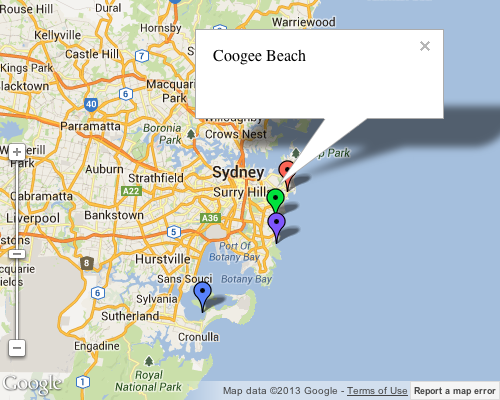
refer: http://chrisltd.com/blog/2013/08/google-map-random-color-pins/
ขึ้นไปด้านบน