
การเชื่อมต่อ JSP sqlServer ด้วย JDBC บน netbeans (2/3) Part II: Perform SQL Operations
หน้าแรก JSP การเชื่อมต่อ JSP sqlServer ด้วย JDBC บน netbeans (2/3) Part II: Perform SQL Operations
From Part I, I have only established a connection with local SQL Server. Next Ill show how to retrieve and modify data on remote SQL Server.
There are 3 parts:
- Part I : Create a connection
This part which youre reading shows about how to establish a connection between NetBeans and SQL Server. In this example, I use SQL Server 2000 SP4 and NetBeans IDE 5.5 - Part II : Perform SQL Operations
This part show how to perform some basic operations from NetBeans with SQL Server. For instance, send querys as SELECT, INSERT, UPDATE to the database. - Part III: Troubleshooting
The last part is about problems and how to fix them.
SQL Server Connection using in this part
Assume that I have SQL Server running remotely on BKKPDC01 computer and I want to connect to Northwind database with username is sa and password is password. The connection string will be
Retrieve data from database
To get some data, I need to execute query on the SQL Server and get the result back to me. First, I create stmt (Statement object) and execute query in SQL language. Then I store the result on ResultSet object and iterative show the result on the output window.
Code Explanation:
- Statement object is used for sending SQL Statement to the database.
- ResultSet object is used to keep data from the executed query.
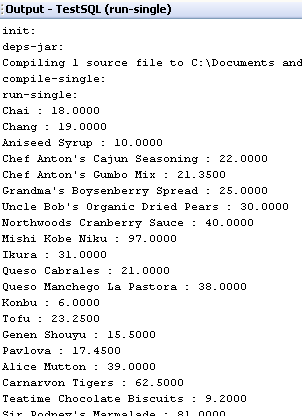
- In while-loop, iterative in the ResultSet object to show result (All ProductName and UnitPrice in Products table) on output window.
The example result will be similar to below.
Update data on database
To insert, update and delete records on SQL Server, you can use the code from retrieve data from database and simply change SQL command and also modify some code a little bit. On update, I must use executeUpdate(�?SQL�?) method on statement object instead executeQuery(SQL�?) and the return value will be rows affected instead of a record set.
Example
INSERT command
UPDATE command
DELETE command
Summary
You can download the source code example here (Right-click on the link and select Save target As
).
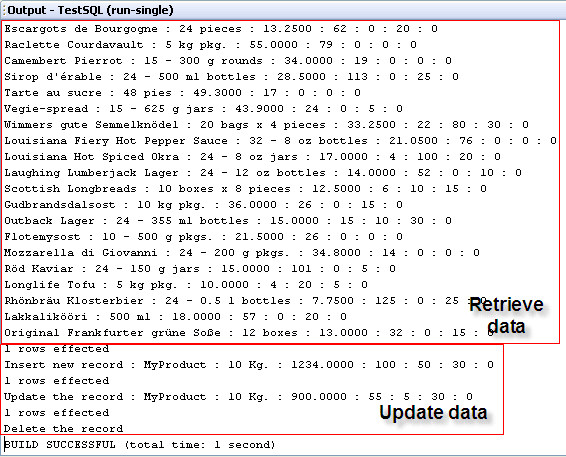
But you have to change connection string to match your environment. The example code will connect to Northwind database and try to retrieve records, insert a new record, update the record and delete the record from Products table. The result is below.
ขึ้นไปด้านบน